CURSED LANDS - PART 2
CURSED LANDS
PART 2
CURSED LANDS - PART 2
Combat, AI & UI
Combat, AI & UI
PURPOSE
PURPOSE
PURPOSE
Part 2 of a small Open-World RPG portfolio piece showcasing my Gameplay Engineering skills using the latest Frameworks (GAS, Gameplay Camera System, Motion Matching, etc.)
Part 2 introduces Combat, AI and UI
serving as the foundation to the final part of the project,
while I'm learning and exploring AI using StateTrees and UI
Part 2 of a small Open-World RPG portfolio piece showcasing my Gameplay Engineering skills using the latest Frameworks (GAS, Gameplay Camera System, Motion Matching, etc.)
Part 2 introduces Combat, AI and UI
serving as the foundation to the final part of the project,
while I'm learning and exploring AI using StateTrees and UI
Part 2 of a small Open-World RPG portfolio piece showcasing my Gameplay Engineering skills using the latest Frameworks (GAS, Gameplay Camera System, Motion Matching, etc.)
Part 2 introduces Combat, AI and UI
serving as the foundation to the final part of the project,
while I'm learning and exploring AI using StateTrees and UI
tech
tech
tech
The project uses Unreal Engine 5 with aim to leverage the latest
Frameworks and Plugins Unreal Engine has to give, such as:
The project uses Unreal Engine 5 with aim to leverage the latest Frameworks and Plugins Unreal Engine has to give, such as:
Motion
Matching
Motion Warping
ChooserTables
ChooserTables
UMG ViewModel
Animation Layering
Common UI
Animation Warping
Gameplay Camera
System (Experimental)
Gameplay Camera
System (Experimental)
Gameplay Ability
System
Gameplay Ability System
StateTrees
StateTrees
MOTION MATCHING
Remember how Part 1 stated that: "The project doesn't use Motion Matching, because this is a personal project that most likely won't have a big data set of Animations to choose from"… Well, scrap that!
In Part 2 I've migrated from the previously introduced ALS (Advanced Locomotion System) to the newly added Motion Matching system. The main reasons for this pivot (pun intended) are:
First
Motion Matching although feels like a much harder system to understand, is actually much easier to set-up and maintain as opposed to the previous solution.
Second
Motion Matching provides much better results than the previous solution, being manually setting up what animation to play and transition to/from.
Thanks to this migration we didn't only improve current animations such as the Start, Stop, Pivot and Turning in Place, but managed with zero effort to introduce new ones such as Transitions between Gaits and Extended Pivoting (Character changing direction in a less than 180 angle, shown with the Prism example below).
❗During the implementation time of the Motion Matching, Epic Games have introduced UAF (Unreal Animation Framework) during "The Witcher 4 Unreal Engine 5 Tech Demo"… It's available in UE 5.7 and experimental, but don't be surprised if you see it in the next part in favor of the current Motion Matching solution 😉
MOTION MATCHING
Remember how Part 1 stated that: "The project doesn't use Motion Matching, because this is a personal project that most likely won't have a big data set of Animations to choose from"… Well, scrap that!
In Part 2 I've migrated from the previously introduced ALS (Advanced Locomotion System) to the newly added Motion Matching system. The main reasons for this pivot (pun intended) are:
First
Motion Matching although feels like a much harder system to understand, is actually much easier to set-up and maintain as opposed to the previous solution.
Second
Motion Matching provides much better results than the previous solution, being manually setting up what animation to play and transition to/from.
Thanks to this migration we didn't only improve current animations such as the Start, Stop, Pivot and Turning in Place, but managed with zero effort to introduce new ones such as Transitions between Gaits and Extended Pivoting (Character changing direction in a less than 180 angle, shown with the Prism example below).
❗During the implementation time of the Motion Matching, Epic Games have introduced UAF (Unreal Animation Framework) during "The Witcher 4 Unreal Engine 5 Tech Demo"… It's available in UE 5.7 and experimental, but don't be surprised if you see it in the next part in favor of the current Motion Matching solution 😉
MOTION MATCHING
Remember how Part 1 stated that: "The project doesn't use Motion Matching, because this is a personal project that most likely won't have a big data set of Animations to choose from"… Well, scrap that!
In Part 2 I've migrated from the previously introduced ALS (Advanced Locomotion System) to the newly added Motion Matching system. The main reasons for this pivot (pun intended) are:
First
Motion Matching although feels like a much harder system to understand, is actually much easier to set-up and maintain as opposed to the previous solution.
Second
Motion Matching provides much better results than the previous solution, being manually setting up what animation to play and transition to/from.
Thanks to this migration we didn't only improve current animations such as the Start, Stop, Pivot and Turning in Place, but managed with zero effort to introduce new ones such as Transitions between Gaits and Extended Pivoting (Character changing direction in a less than 180 angle, shown with the Prism example below).
❗During the implementation time of the Motion Matching, Epic Games have introduced UAF (Unreal Animation Framework) during "The Witcher 4 Unreal Engine 5 Tech Demo"… It's available in UE 5.7 and experimental, but don't be surprised if you see it in the next part in favor of the current Motion Matching solution 😉
MOTION MATCHING
Remember how Part 1 stated that: "The project doesn't use Motion Matching, because this is a personal project that most likely won't have a big data set of Animations to choose from"… Well, scrap that!
In Part 2 I've migrated from the previously introduced ALS (Advanced Locomotion System) to the newly added Motion Matching system. The main reasons for this pivot (pun intended) are:
First
Motion Matching although feels like a much harder system to understand, is actually much easier to set-up and maintain as opposed to the previous solution.
Second
Motion Matching provides much better results than the previous solution, being manually setting up what animation to play and transition to/from.
Thanks to this migration we didn't only improve current animations such as the Start, Stop, Pivot and Turning in Place, but managed with zero effort to introduce new ones such as Transitions between Gaits and Extended Pivoting (Character changing direction in a less than 180 angle, shown with the Prism example below).
❗During the implementation time of the Motion Matching, Epic Games have introduced UAF (Unreal Animation Framework) during "The Witcher 4 Unreal Engine 5 Tech Demo"… It's available in UE 5.7 and experimental, but don't be surprised if you see it in the next part in favor of the current Motion Matching solution 😉
MOTION MATCHING
Remember how Part 1 stated that: "The project doesn't use Motion Matching, because this is a personal project that most likely won't have a big data set of Animations to choose from"… Well, scrap that!
In Part 2 I've migrated from the previously introduced ALS (Advanced Locomotion System) to the newly added Motion Matching system. The main reasons for this pivot (pun intended) are:
First
Motion Matching although feels like a much harder system to understand, is actually much easier to set-up and maintain as opposed to the previous solution.
Second
Motion Matching provides much better results than the previous solution, being manually setting up what animation to play and transition to/from.
Thanks to this migration we didn't only improve current animations such as the Start, Stop, Pivot and Turning in Place, but managed with zero effort to introduce new ones such as Transitions between Gaits and Extended Pivoting (Character changing direction in a less than 180 angle, shown with the Prism example below).
❗During the implementation time of the Motion Matching, Epic Games have introduced UAF (Unreal Animation Framework) during "The Witcher 4 Unreal Engine 5 Tech Demo"… It's available in UE 5.7 and experimental, but don't be surprised if you see it in the next part in favor of the current Motion Matching solution 😉
MOTION MATCHING
Remember how Part 1 stated that: "The project doesn't use Motion Matching, because this is a personal project that most likely won't have a big data set of Animations to choose from"… Well, scrap that!
In Part 2 I've migrated from the previously introduced ALS (Advanced Locomotion System) to the newly added Motion Matching system. The main reasons for this pivot (pun intended) are:
First
Motion Matching although feels like a much harder system to understand, is actually much easier to set-up and maintain as opposed to the previous solution.
Second
Motion Matching provides much better results than the previous solution, being manually setting up what animation to play and transition to/from.
Thanks to this migration we didn't only improve current animations such as the Start, Stop, Pivot and Turning in Place, but managed with zero effort to introduce new ones such as Transitions between Gaits and Extended Pivoting (Character changing direction in a less than 180 angle, shown with the Prism example below).
❗During the implementation time of the Motion Matching, Epic Games have introduced UAF (Unreal Animation Framework) during "The Witcher 4 Unreal Engine 5 Tech Demo"… It's available in UE 5.7 and experimental, but don't be surprised if you see it in the next part in favor of the current Motion Matching solution 😉
STATE TREES
STATE TREES
State Trees are on the path to replace Behavior Trees for AI use cases, but on top of that, State Trees are a general-purpose solution and are becoming the decision-making solution for many of the new features/systems in Unreal Engine, such as:
State Trees are on the path to replace Behavior Trees for AI use cases, but on top of that, State Trees are a general-purpose solution and are becoming the decision-making solution for many of the new features/systems in Unreal Engine, such as:
AI
With UE 5.6, the template projects include AI that is done using State Trees instead of Behavior Trees.
With UE 5.6, the template projects include AI that is done using State Trees instead of Behavior Trees.
Gameplay Camera System
With UE 5.6, the experimental Gameplay Camera System now includes a State Tree Camera Director that can be used for Camera Rig choosing.
With UE 5.6, the experimental Gameplay Camera System now includes a State Tree Camera Director that can be used for Camera Rig choosing.
Unreal Aimation Framework
With the upcoming UE 5.7, the introduction of UAF (Unreal Animation Framework) is also going to include a plugin for integrating State Trees into UAF.
With the upcoming UE 5.7, the introduction of UAF (Unreal Animation Framework) is also going to include a plugin for integrating State Trees into UAF.
So, in Part 2, I've extended the usage of State Trees and added them in the next areas:
So, in Part 2, I've extended the usage of State Trees and added them in the next areas:
STATE TREES x GAMEPLAY CAMERA SYSTEM
I've updated the Player Character's Gameplay Camera component to use a Camera Asset that is driven by a State Tree Camera Director as opposed to the Blueprint Camera Director.
Using so have also made it even easier for me to add additional Camera Rigs, like the "Menace" PostProcess Camera Rig, representing a reference to a well-known Anime 😉
The way to integrate the Gameplay Camera System with State Trees is explained in an Unreal Engine Community tutorial I've created:
How to: Set up Gameplay Camera System (Experimental) with State Trees
STATE TREES x GAMEPLAY CAMERA SYSTEM
I've updated the Player Character's Gameplay Camera component to use a Camera Asset that is driven by a State Tree Camera Director as opposed to the Blueprint Camera Director.
Using so have also made it even easier for me to add additional Camera Rigs, like the "Menace" PostProcess Camera Rig, representing a reference to a well-known Anime 😉
The way to integrate the Gameplay Camera System with State Trees is explained in an Unreal Engine Community tutorial I've created:
How to: Set up Gameplay Camera System (Experimental) with State Trees
STATE TREES x GAMEPLAY CAMERA SYSTEM
I've updated the Player Character's Gameplay Camera component to use a Camera Asset that is driven by a State Tree Camera Director as opposed to the Blueprint Camera Director.
Using so have also made it even easier for me to add additional Camera Rigs, like the "Menace" PostProcess Camera Rig, representing a reference to a well-known Anime 😉
The way to integrate the Gameplay Camera System with State Trees is explained in an Unreal Engine Community tutorial I've created:
How to: Set up Gameplay Camera System (Experimental) with State Trees
STATE TRESS x PLAYER
I've extracted all of the Player Character's falling logic, which was previously done using a custom Actor Component called the CFC (Character Fall Component) and moved it entirely into the Player Character's State Tree.
This is due to the fact that both serve a similar purpose, and I'd rather use an already mature and integrated system instead of my own.
None the less, the usage and making of the CFC can be found in the Unreal Engine Community tutorials I've created:
Making of: Character Fall System and Character Fall Component (CFC)
Usage of: Character Fall System and Character Fall Component (CFC)
STATE TRESS x PLAYER
I've extracted all of the Player Character's falling logic, which was previously done using a custom Actor Component called the CFC (Character Fall Component) and moved it entirely into the Player Character's State Tree.
This is due to the fact that both serve a similar purpose, and I'd rather use an already mature and integrated system instead of my own.
None the less, the usage and making of the CFC can be found in the Unreal Engine Community tutorials I've created:
Making of: Character Fall System and Character Fall Component (CFC)
Usage of: Character Fall System and Character Fall Component (CFC)
STATE TRESS x PLAYER
I've extracted all of the Player Character's falling logic, which was previously done using a custom Actor Component called the CFC (Character Fall Component) and moved it entirely into the Player Character's State Tree.
This is due to the fact that both serve a similar purpose, and I'd rather use an already mature and integrated system instead of my own.
None the less, the usage and making of the CFC can be found in the Unreal Engine Community tutorials I've created:
Making of: Character Fall System and Character Fall Component (CFC)
Usage of: Character Fall System and Character Fall Component (CFC)
STATE TREES x AI
Finally, I've used State Trees for its original purpose which is AI behavior.
The AI behavior in Part 2 is straight forward, the Enemy chases the Player's Character, and upon reaching it, it starts an attack and upon hitting the ground deals damage to the Player's Character in case it's still in range of the attack.
STATE TREES x AI
Finally, I've used State Trees for its original purpose which is AI behavior.
The AI behavior in Part 2 is straight forward, the Enemy chases the Player's Character, and upon reaching it, it starts an attack and upon hitting the ground deals damage to the Player's Character in case it's still in range of the attack.
STATE TREES x AI
Finally, I've used State Trees for its original purpose which is AI behavior.
The AI behavior in Part 2 is straight forward, the Enemy chases the Player's Character, and upon reaching it, it starts an attack and upon hitting the ground deals damage to the Player's Character in case it's still in range of the attack.
State Trees are on the path to replace Behavior Trees for AI use cases, but on top of that, State Trees are a general-purpose solution and are becoming the decision-making solution for many of the new features/systems in Unreal Engine, such as:
AI
With UE 5.6, the template projects include AI that is done using State Trees instead of Behavior Trees.
Gameplay Camera System
With UE 5.6, the experimental Gameplay Camera System now includes a State Tree Camera Director that can be used for Camera Rig choosing.
Unreal Aimation Framework
With the upcoming UE 5.7, the introduction of UAF (Unreal Animation Framework) is also going to include a plugin for integrating State Trees into UAF.
So, in Part 2, I've extended the usage of State Trees and added them in the next areas:
USER INTERFACE
For Part 2, I knew I wanted to include a proper UI (User Interface) and learn what are the correct tools and plugins for UI development in Unreal Engine. During that process I believe I've achieved not only a clean and unique looking UI but also learned which about the different widget types to use and what plugins are at our disposal when working with UI and how to work with them. Those include:
UMG Viewmode
This plugin allowed me to use a Model View View-Model architecture to integrate communication between the UI and the data/logic, specifically useful when integrating the Health and Stamina Bars with their respective GAS (Gameplay Ability System) Attributes.
Common UI Plugin
This plugin allowed me to implement behavior logics, separate Input Mapping Contexts, and different Input UI all depending on the Input Type (Mouse/Keyboard vs Gamepad, as well as XSX vs PS5)
CommonLoadingScreen
(a Lyra Plugin)
This is one of two plugins that aren't part of the available plugins in the editor but instead was taken out from the Lyra Sample Game project. This one allowed to easily add a simple Loading Screen to be used between levels.
GameSettings
(a Lyra Plugin)
The second plugin that isn't part of the editor plugins, allowed me to easily create the Game Settings UI. This plugin provides a lot of built in UI classes that integrate with CommonUI and allow you to create a clean Settings screen like seen in all modern games.
Below you can see the Main Menu, New Game selection, and Settings screens created for the project.
⚠️ Those aren't the final screens, as the final ones aren't UI only but a part of a Main Menu level.
UI - CUSTOM ELEMENTS
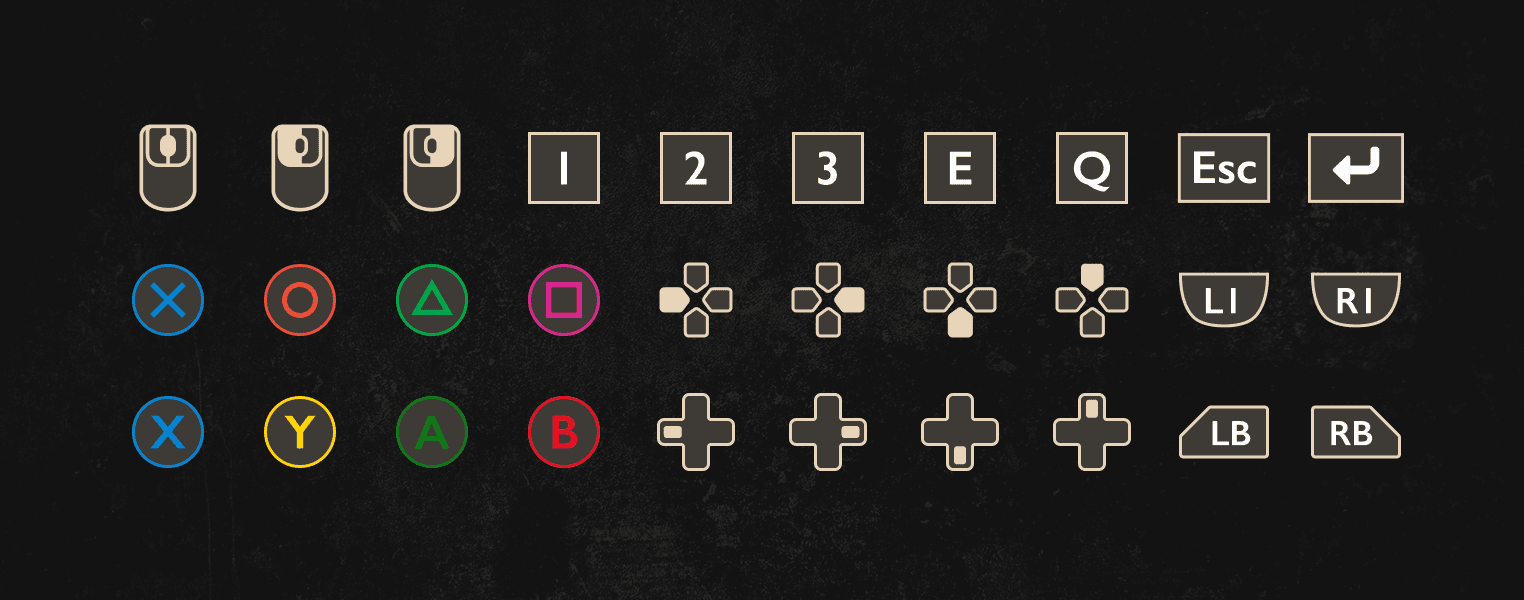
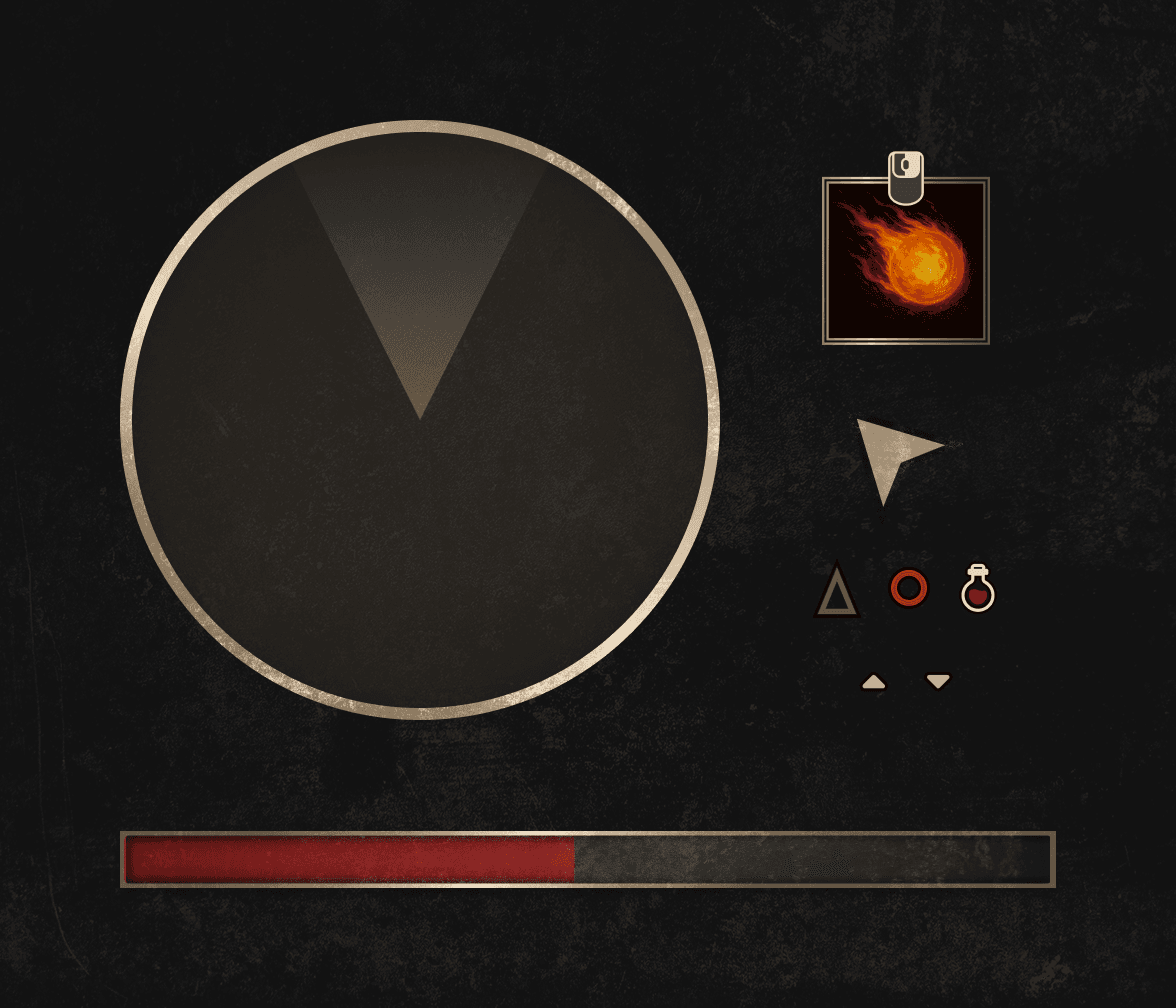
Thanks to the help of my amazing wife, Danielle Nir Vasserman, who is a UI/UX Designer, we've used only custom UI elements meant to give a single common brand book and UI language throughout the entire UI, whether it's the Menu/Settings screens, the Player's HUD, or input icons, all are designed to have a common UI language.
UI - INTERACTIVE HUD
All of the HUD UI is interactive and reacts either to connected Viewmodels or events (achieved by the usage of Gameplay Tags) resulting in animations and indicators providing the Player with a much better experience.
Such include (as shown by the videos below):
- Minimap: The Minimap reacts depending on the location difference between the Player and other Actors, to indicate if they are above or below.
- Resource Bar: The Health and Stamina bars react to the increase and decrease of the resource, resulting in a slight indicator when the resource is at Critical threshold. Other UI widgets also react to this but not shown here (such as an overlay indicating Critical Health or Fatigue Debuff)
- Abilities Bar: Not only the Abilities react to entering/exiting cooldown, but the entire bar reacts to Aiming, to show which Abilities are available at what point.
USER INTERFACE
USER INTERFACE
For Part 2, I knew I wanted to include a proper UI (User Interface) and learn what are the correct tools and plugins for UI development in Unreal Engine. During that process I believe I've achieved not only a clean and unique looking UI but also learned which about the different widget types to use and what plugins are at our disposal when working with UI and how to work with them. Those include:
For Part 2, I knew I wanted to include a proper UI (User Interface) and learn what are the correct tools and plugins for UI development in Unreal Engine. During that process I believe I've achieved not only a clean and unique looking UI but also learned which about the different widget types to use and what plugins are at our disposal when working with UI and how to work with them. Those include:
UMG Viewmode
This plugin allowed me to use a Model View View-Model architecture to integrate communication between the UI and the data/logic, specifically useful when integrating the Health and Stamina Bars with their respective GAS (Gameplay Ability System) Attributes.
This plugin allowed me to use a Model View View-Model architecture to integrate communication between the UI and the data/logic, specifically useful when integrating the Health and Stamina Bars with their respective GAS (Gameplay Ability System) Attributes.
Common UI Plugin
This plugin allowed me to implement behavior logics, separate Input Mapping Contexts, and different Input UI all depending on the Input Type (Mouse/Keyboard vs Gamepad, as well as XSX vs PS5)
This plugin allowed me to implement behavior logics, separate Input Mapping Contexts, and different Input UI all depending on the Input Type (Mouse/Keyboard vs Gamepad, as well as XSX vs PS5)
CommonLoadingScreen
(a Lyra Plugin)
This is one of two plugins that aren't part of the available plugins in the editor but instead was taken out from the Lyra Sample Game project. This one allowed to easily add a simple Loading Screen to be used between levels.
This is one of two plugins that aren't part of the available plugins in the editor but instead was taken out from the Lyra Sample Game project. This one allowed to easily add a simple Loading Screen to be used between levels.
GameSettings
(a Lyra Plugin)
The second plugin that isn't part of the editor plugins, allowed me to easily create the Game Settings UI. This plugin provides a lot of built in UI classes that integrate with CommonUI and allow you to create a clean Settings screen like seen in all modern games.
The second plugin that isn't part of the editor plugins, allowed me to easily create the Game Settings UI. This plugin provides a lot of built in UI classes that integrate with CommonUI and allow you to create a clean Settings screen like seen in all modern games.
Below you can see the Main Menu, New Game selection, and Settings screens created for the project.
⚠️ Those aren't the final screens, as the final ones aren't UI only but a part of a Main Menu level.
Below you can see the Main Menu, New Game selection, and Settings screens created for the project.
⚠️ Those aren't the final screens, as the final ones aren't UI only but a part of a Main Menu level.
UI - CUSTOM ELEMENTS
UI - CUSTOM ELEMENTS
Thanks to the help of my amazing wife, Danielle Nir Vasserman, who is a UI/UX Designer, we've used only custom UI elements meant to give a single common brand book and UI language throughout the entire UI, whether it's the Menu/Settings screens, the Player's HUD, or input icons, all are designed to have a common UI language.
Thanks to the help of my amazing wife, Danielle Nir Vasserman, who is a UI/UX Designer, we've used only custom UI elements meant to give a single common brand book and UI language throughout the entire UI, whether it's the Menu/Settings screens, the Player's HUD, or input icons, all are designed to have a common UI language.
UI - INTERACTIVE HUD
UI - INTERACTIVE HUD
All of the HUD UI is interactive and reacts either to connected Viewmodels or events (achieved by the usage of Gameplay Tags) resulting in animations and indicators providing the Player with a much better experience.
Such include (as shown by the videos below):
- Minimap: The Minimap reacts depending on the location difference between the Player and other Actors, to indicate if they are above or below.
- Resource Bar: The Health and Stamina bars react to the increase and decrease of the resource, resulting in a slight indicator when the resource is at Critical threshold. Other UI widgets also react to this but not shown here (such as an overlay indicating Critical Health or Fatigue Debuff)
- Abilities Bar: Not only the Abilities react to entering/exiting cooldown, but the entire bar reacts to Aiming, to show which Abilities are available at what point.
All of the HUD UI is interactive and reacts either to connected Viewmodels or events (achieved by the usage of Gameplay Tags) resulting in animations and indicators providing the Player with a much better experience.
Such include (as shown by the videos below):
- Minimap: The Minimap reacts depending on the location difference between the Player and other Actors, to indicate if they are above or below.
- Resource Bar: The Health and Stamina bars react to the increase and decrease of the resource, resulting in a slight indicator when the resource is at Critical threshold. Other UI widgets also react to this but not shown here (such as an overlay indicating Critical Health or Fatigue Debuff)
- Abilities Bar: Not only the Abilities react to entering/exiting cooldown, but the entire bar reacts to Aiming, to show which Abilities are available at what point.
CREDITS
CREDITS
CREDITS

EPIC GAMES

MIXAMO

QUIXEL BRIDGE
EPIC GAMES
MIXAMO
QUIXEL BRIDGE
A list of all used assets and their credits can be found in the GitHub repository's README.md file.
A list of all used assets and their credits can be found in the GitHub repository's README.md file.
© Anton Vasserman 2026. All rights reserved.
© Anton Vasserman 2026. All rights reserved.
© Anton Vasserman 2026.
All rights reserved.
© Anton Vasserman 2026. All rights reserved.
© Anton Vasserman 2026. All rights reserved.